
Steps to Make a Withdrawal for Agent Commission
Below are the steps on how you can make the withdrawal when you start making money on a9play.
In general, it is very simple. Just 2 steps to complete the process.
- Make an internal transfer from the a9 play agent kiosk.
- Make a withdrawal from the a9today ewallet.
In detail, we will show you how to complete the internal transfer and withdrawal process.
How to Make an A9 eWallet Internal Transfer
Step 1: Log in to your A9 Play Agent Kiosk.
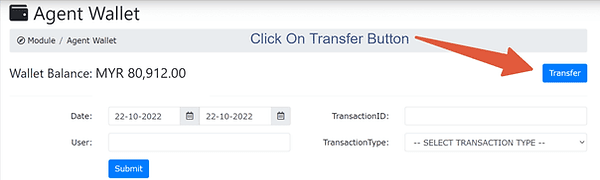
Step 2: Click on the Agent wallet, as shown in the picture below.

Step 3: Click on the "Transfer" button as shown below.
Step 4: Select "Player" and enter your own player phone number that you used to register as a member.
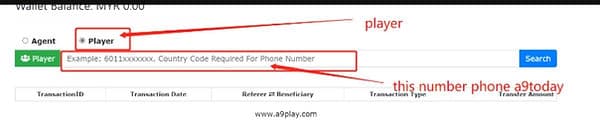
Please note that the number format to enter should be 60xxxxxxx, with the complete country code.
After transfer to your own player's a9play ewallet, follow the normal steps to withdraw as below.
Steps to Make a Withdrawal on a9play eWallet
Step 1: Log in to a9play from the a9play app you installed on your mobile.
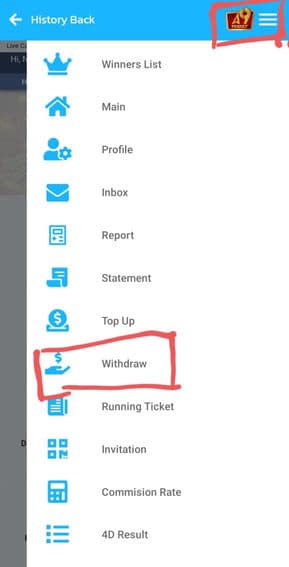
Step 2: Click the "Withdrawal" menu as shown on the screen below.
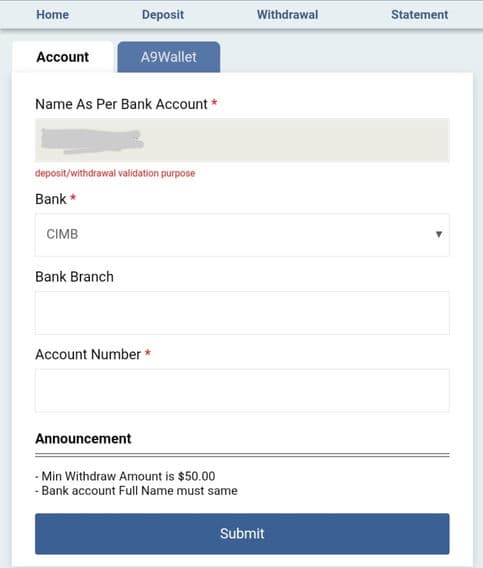
Step 3: Next, select your bank and fill in the information such as bank branch and account number. Then click the "Submit" button for your withdrawal request.
Note: The minimum withdrawal is RM50. The bank account's full name must be the same as your A9Play account. For all withdrawals, if the status is still pending or in process, please wait 15 to 30 minutes.